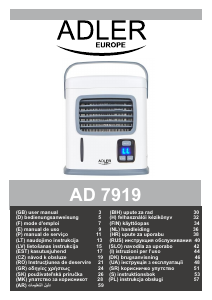
Manual Adler AD 7919 Ventilator

Ai nevoie de un manual pentru Adler AD 7919 Ventilator? Mai jos puteți vizualiza și descărca manualul PDF gratuit în limba română. Acest produs are în prezent 2 întrebări frecvente, 2 comentarii și are 0 voturi. Dacă acesta nu este manualul dorit, vă rugăm să ne contactați.

Produsul dvs. s-a defectat și manualul nu oferă nicio soluție? Mergeți la Repair Café pentru servicii de reparații gratuite.

Manual

Loading…

4
20. Do not touch power cord with wet hands.
21. Unplug the unit when cleaning, removing / replacing filter, or moving the device.
22. for best results, place the unit on a higher surface like a table or countertop.
23. Do not place the device in passageways or high traffic areas where there is a
possibility of tripping or knocking it over.
24. Do not allow any foreign objects inside the device.
25. Do not place items on the top of device.
26. Do not block the front and back grills of the device.
27. Do not turn the device upside down.
28. Do not submerge the device under water or other liquids.
PRODUCT DESCIRPTION Air Cooler AD7919 (Figure I.)
1. Water tank 2. Water tank lid 3. USB cord
4. Lifting handle 5. Adjustable air outlet 6. Water level gauge
7. Power switch 8. Fan air speed button 9. Timer button
10. USB port 11. Drain plug 12. Batteries chamber cover
13. LCD display
BEFORE FIRST USE
1. Place the device on a raised surface as table, desk or counter top. This is the best way to cool your personal area faster.
2. Let filter absorb water for at least 3 minutes after filling the tank and before use. Doing so will get you coolest air quicker.
3. Try to stay within 1-2m of the device.
4. The device will run up to approximately 8-10 hours on low fan speed after filling up the water tank by 500ml of clean water.
5. Even if water tank is empty, filter is still damp and the device is still cooling.
During using a device powered by USB 5V, there is no need to remove the battery. When connecting the device to the USB 5V power
port, the battery power is automatically disconnected. During supplying the device with AA batteries, it is not possible to charge AA
batteries. It is recommended to remove the battery from the device if the battery is not used for a longer period (one month).
USING OF DEVICE
1. Place the device on flat surface.
2. Open the water tank lid and fill with water, we suggest use the jug (Figure II). Do not exceed maximum level at water gauge.
3. To supply the device you can chose one of below method:
- USB supply: Insert larger USB end of cable (3a) into your computer's USB port and the smaller end (3b) into the USB port (10) on the
back of the device.
- Batteries supply: Open the batteries chamber cover (12) by pressing both latches down and toward you to put 4 pieces of AA batteries
(1,5V) – not included with device. Batteries should be paced in correct position to match plus and minus indication shown inside
batteries chamber with actual position of battery. In order to disasemble battery act in oppositive way.
4. Press button ON/OFF (7) to power on the device.
5. Press button SPEED (8) to set the fan speed. Actual setting you will see on LCD display (13), by again pressing you can choose
from:
LL – low fan speed
HH – high / fast fan speed
6. Press button TIMER (9) to set up operation time. Range of period is from 1 to 12 hours an hour interval. The device stops operation
automatically after set up time passed.
7. Press button ON/OFF (7) again to turn off the device.
REMARK: We recommend running the device on fast fan speed for at least 5 minutes before turning off to allow drying it.
CLEANING AND MAINTENANCE
CAUTION: Do not allow the device's buttons to get wet.
1.Before cleaning the device remove the USB cable and batteries.
2.The housing should be cleaned using a damp cloth with a small amount of detergent.
3.To remove dust from grills may occasionally be wiped with a brush.
4. Before seasonal storage, empty water from water tank by unscrewing the drain plug (11). Next, we recommend running the device on
fast fan speed for 15 minutes before turning off to allow drying it.
5. Store the fan in a dry place.
TECHNICAL DATA
Power supply: USB 5V 0,5A or 4 pieces of AA 1,5V batteries
Power: 5W
Maximum power 50W
1,2m USB cord
Water tank capacity: 500ml
Water consumption: 50ml / hour
Noise level: < 50dB
Descărcaţi manualul în limba română (PDF, 4.45 MB)
(Protejați mediul înconjurător și imprimați acest manual numai dacă este neapărată nevoie)

Loading…

Evaluare

Spuneți-ne ce părere aveți despre Adler AD 7919 Ventilator, lăsând o evaluare a produsului. Doriți să împărtășiți experiența dvs. cu acest produs sau să adresați o întrebare? Lăsați un comentariu în partea de jos a paginii.
Ești mulțumit de Adler AD 7919 Ventilator?
Da Nu
Fiți primul care evaluează acest produs
0 voturi

Alăturați-vă conversației despre acest produs

Aici puteți împărtăși ce părere aveți despre Adler AD 7919 Ventilator. Dacă aveți o întrebare, citiți mai întâi cu atenție manualul. Solicitarea unui manual se poate face folosind formularul nostru de contact.

Luisa Pozzi 24-06-2022
aparatul pornește dar nu funcționează

răspuns | A fost util (0) (Tradus de Google)
Luisa Pozzi 24-06-2022
aplicația <recchio este nouă pornește dar nu funcționează

răspuns | A fost util (0) (Tradus de Google)

Mai multe despre acest manual

Înțelegem că este plăcut să aveți un manual pe hârtie pentru Adler AD 7919 Ventilator. Puteți oricând descărca manualul de pe site-ul nostru web și îl puteți imprima singur. Dacă doriți să aveți un manual original, vă recomandăm să contactați Adler. S-ar putea să ofere un manual original. Căutați manualul dvs. Adler AD 7919 Ventilator într-o altă limbă? Alegeți limba preferată pe pagina noastră de pornire și căutați numărul de model pentru a vedea dacă îl avem disponibil.

Specificații

Marcă Adler
Model AD 7919
Categorie Ventilatoare
Tip fișier PDF
Mărime fișier 4.45 MB

Toate manualele pentru Adler Ventilatoare
Mai multe manuale pentru Ventilatoare

Întrebări frecvente despre Adler AD 7919 Ventilator

Echipa noastră de asistență caută informații utile despre produs și răspunde la întrebările frecvente. Dacă descoperiți o inexactitate în întrebările frecvente, vă rugăm să ne anunțați utilizând formularul de contact.

Influențează un ventilator temperatura camerei? Verificat

Nu, un ventilator mișcă doar aerul, oferind un efect de răcire a pielii.

A fost util (219) Citeşte mai mult

Care este cel mai bun loc pentru un fan? Verificat

Dacă există o sursă de aer rece, cum ar fi un aparat de aer condiționat, un ventilator poate fi utilizat pentru a distribui mai bine și în continuare acel aer rece. Dacă se folosește doar ventilatorul, cel mai bine este să-l așezați cu capul înalt. Capul este una dintre părțile corpului care transpare cel mai mult și aerul în mișcare ajută la disiparea căldurii. Acest lucru oferă efectul maxim de răcire.

A fost util (216) Citeşte mai mult
Manual Adler AD 7919 Ventilator

Produse asemanatoare

Categorii relevante

×
Download