BA SC28X_3_4_pro FINDER 12.9X; DE, GB, FR, IT - 22545 - 2010.05-05
GB
Instruction Manual -
Time switch with Astro function
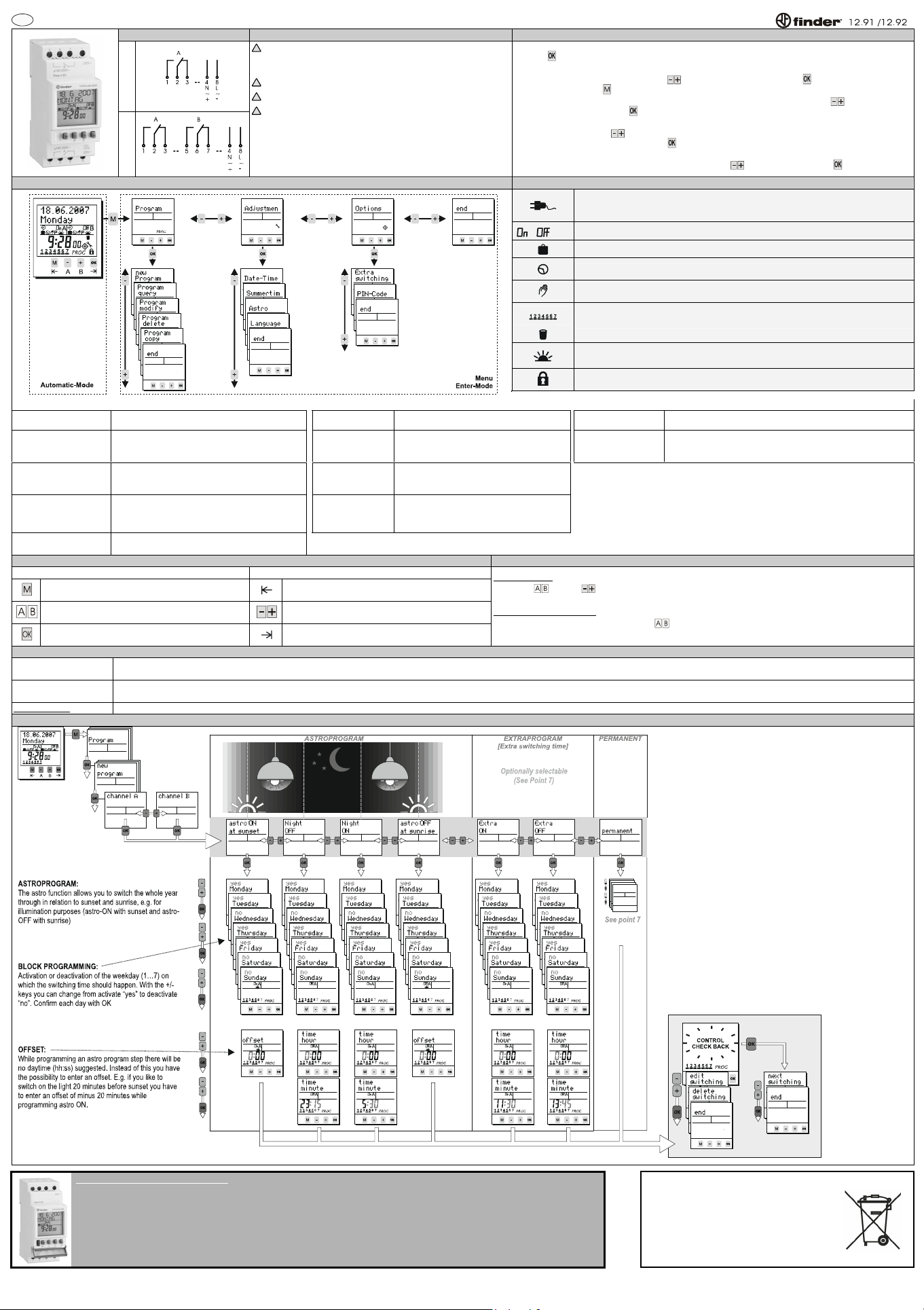
Connection diagram 1. Safety instructions 2. Initial operation
1 channel
2 channels
!
The installation and assembly of electrical equipment must be only
carried out only by a skilled Person! Otherwise fire danger or danger of
an electric shock exists!
!
Connect the supply voltage/frequency as stated on the product label!
!
Warranty void if housing opened by unauthorised person!
!
The electronic circuit is protected against a wide range of external
influences. Incorrect operating may occur if external influences exceed
certain limits!
The time switch is delivered in sleep-mode, the display is switched off.
Press -button for 1 second.
The current date and time is already programmed and European daylight savings time is activated.
Select the desired language by pressing -buttons and confirm it by pressing .
(Remark: By pressing you move one step backwards from the current position)
If required, date, time and daylight savings time mode can be adjusted also by pressing -buttons and a
subsequent confirmation with .
When using the astro function it is obligatory to enter the geographical position of the place of the installation of
the device. Choose with -buttons between „location“ (pre-defined cities) and „position“ (longitude and
latitude). Confirm your choice again with . (The easiest way is choosing a pre-defined city within the
„locations“-menu.)
Enter the nearest city or the geographical coordinates with -buttons and confirm with
3. Menu overview 4. Symbol legend
Power plug symbol (flashing): While the power supply is disconnected, the display shows a
power plug symbol (flashing). The time switch is then operated in the reserve mode. Press OK-
button for 1 sec. to “wake up” the time switch.
/ / P
Channel is switched ON / Channel is switched OFF / Permanent
For the current date the “holiday program” / “permanent by date” is activated
Standard programming step
Current state is based on a manual over-ride. The state will be cancelled with the next
programming step.
Days of the week Monday, Tuesday, ... Sunday;
The underscores indicate if the program is active for the days above.
Element within sub-menu “program delete”
Astro function: Current state is based on a sunrise or sunset taking into account an optionally
adjusted Offset.
The time switch is locked; to unlock the device the PIN has to be entered.
Menu Program Menu Adjustment
Menu Options
New program
See point 7 (New program)
Date-Time
Adjustment of date and time
Extra
switching time
See point 8
Program query
To query the programming steps and remaining
memory locations
Summertime
Adjustment of the daylight saving time mode
PIN-Code
The time switch can be locked with a 4-digit PIN-Code. The code can
be adjusted, activated and deactivated. If you have forgotten the Code
please call customer service.
Program modify
Within Program modify each single switching time can
be modified.
Astro
Adjust your geographical position with pre-
defined choice of regions/countries and cities or
with longitude, latitude and time zone.
Program delete
Deletion of switching time(s). The program for all
channels, single channels and single programming
steps within on channel can be deleted.
Language
Choice of languages
Program copy
Copy from one channel to another.
5. Key function 6. Channel ON OFF / Permanent P
Automatic-Mode Menu / Enter-Mode
To access the Enter-mode (program, adjustments, options)
from the automatic-mode
To revert to the beginning of the current (sub-) menu
To switch the channel ON or OFF until the next
programming step occurs.
To adjust the flashing digit. To scroll through a choice
To activate the time switch when operated without power
supply.
To confirm the selection or the entered data.
Channel
ON OFF
By pushing
-buttons ( -buttons) a manual switch of the channels take place. The resulting switching status is
marked with the hand-symbol and remains until the next programming step occurs. (temporary over-ride)
Permanent switching status P
By pressing the corresponding channel button
for more than 3 sec. the channel is permanently switched ON or OFF.
The status remains until the next manual switching occurs (> 3 sec.). (permanent over-ride)
7. Program permanent / Extra switching time / Reset
Permanent
One permanent by date programming step (holiday function) for each channel is possible. During the desired period (The function is valid for the whole days) the channel can be switched off (permanent off) or on (permanent on).
The choice permanent will not be offered anymore within the menu new program when already in use. The switching time can be modified and deleted within Program modify and Program delete respectively. (See Point 8)
Extra
switching time
You can program further “extra” switching times e.g. if you like to use a channel of the time switch for a non-“Astro lighting-application”. You have to activate the “extra switching times” within the menu Options. The “extra switching
times” works like a standard weekly program (ON / OFF). After activating the “extra switching time” it will be offered within the programming menu “new program”. (See Point 8)
Reset-Function Press all front keys for 2 seconds. The time switch is reset. The values for date and time will be deleted and have to be re-entered. The switching program has not been deleted!
8. New program
12.9X.X.XXX.0090 / Data-key (OPTIONAL)
With a Data-key following activities are possible:
Save data: Writes the data from the time switch into the memory of the Data-key.
Program timeswitch: Writes the data located inside the Key into the memory.
Key function: The time switch will solely apply programming steps from the Data-key. The switching program of the time switch is suppressed.
Key readout: To query the switching program of the Data-key.
BATTERY CR 2450 (LiMnO2) 3 V.
Complies with Article 11, EU directive 2006/66/CE.


Alăturați-vă conversației despre acest produs
Aici puteți împărtăși ce părere aveți despre Finder 12.92.8.230.0000 Ceas programator. Dacă aveți o întrebare, citiți mai întâi cu atenție manualul. Solicitarea unui manual se poate face folosind formularul nostru de contact.