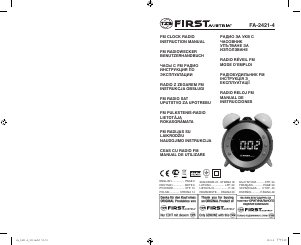
Manual First Austria FA-2421-7 Radio cu ceas

Ai nevoie de un manual pentru First Austria FA-2421-7 Radio cu ceas ? Mai jos puteți vizualiza și descărca manualul PDF gratuit în limba română. Acest produs are în prezent 3 întrebări frecvente, 3 comentarii și are 7 voturi cu o evaluare medie a produsului de 14/100. Dacă acesta nu este manualul dorit, vă rugăm să ne contactați.

Produsul dvs. s-a defectat și manualul nu oferă nicio soluție? Mergeți la Repair Café pentru servicii de reparații gratuite.

Manual

Loading…
2
3
INSTRUCTION MANUAL
FM CLOCK RADIO
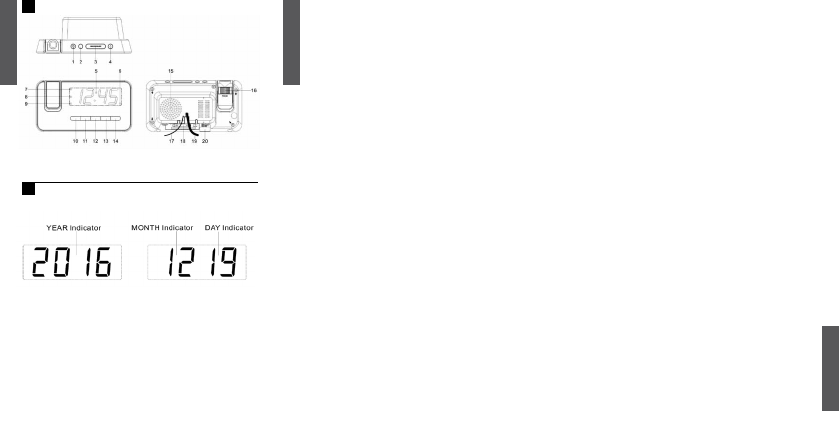
LOCATION OF CONTROLS
(see g. 1)
POWER CONNECTION
Plug the AC power cord to a household outlet AC source. This unit is equipped
with a battery back up system, it requires a 1x3V CR2032 Flat Lithium battery
(Not included). Insert the battery in the battery compartment, making certain
that the positive and negative (+ and -) battery terminals are attached to the
corresponding terminals on the plate in the battery compartment. If an AC
power failure occurs, the clock automatically switches to the battery power
supply, the clock and timer memory continue running. When the AC power
resumes, the clock switches back to AC again.
GETTING STARTED
TIME AND CALENDAR MANUAL SETTING
Press CLK.ADJ. button (10), in standby mode, and keep depress over 3
seconds to enter time set mode, after enter the setting mode, press CLK.ADJ
button (10) to change the mode cycle as follows:
Normal —> Year —> Month —> Day —> 12/24H —> Real time Hour —>
Real time Min —> Normal
Action (during data adjustment):
Press <</Tune- button (11) to adjust data backward.
Press >>/Tune+ button (12) to adjust data forward.
Keep depress << or >> button for 3 seconds to enable auto forward.
ALARM
SETTING ALARM
Press the alarm set button (13/14) during normal mode to show the alarm time.
Afterwards keep depress the alarm set button (13/14) over 2 seconds to enter
the alarm set mode. After enter the setting mode, press the alarm set button
(13/14) to change the mode cycle as follows :
Normal —> AL 1 Hour —> AL 1 Min —> AL 1 weekday Alarm —> AL 1 wake
beep —> AL 1 wake radio —> AL 1 wake radio volume —> Normal
Normal —> AL 2 Hour —> AL 2 Min —> AL 2 weekday Alarm —> AL 2 wake
beep —> AL 2 wake radio —> AL 2 wake radio volume —> Normal
Select alarm weekday mode as follows
1-5: Monday to Friday
1-7: Whole week
6-7: Saturday & Sunday
1-1: One day of week
Action (during data adjustment):
Press <</Tune- button (11) to adjust data backward.
Press >>/Tune+ button (12) to adjust data forward.
Keep depress << or >> button for 2 seconds to enable auto forward.
ENABLE/DISABLE THE ALARM
Press and hold the “ALARM 1” (13)/“ALARM 2” (14) button to enable or disable
the alarm. Once the alarm is activated, the bell symbol will be appeared on the
display.
ALARM DURATION AND SNOOZE FUNCTION:
Alarm Duration – Beep alarm or radio alarm will continue output for 30 minutes
if no key press, then it will stop automatically and wait for same alarm time on
next day.
Action for Snooze:
During alarming, press Snooze button (3) will enable snooze function, Beep
alarm or Radio alarm will stop.
Snooze interval is 9 minute (not include second offset)
Snooze will continue unless press ON/OFF button (4) to alarm off of Buzzer
alarm or Radio Alarm stop automatically after 30 minutes.
Display Auto on-off function:
Press & hold the display auto on-off button (12) for 3 seconds, the LED
display Indicator will light on, the LED display will turn off after 15 seconds
automatically. Press any button to maintain the LED display for 15 seconds.
Press & hold the display auto on-off button (12) for 3 seconds, the LED
display Indicator will light off to cancel this function.
AUTO CHANGE DISPLAY CONTENT (see g. 2)
In radio off mode, press the DISPLAY AUTO CHANGE ON/OFF (11) button
and keep depressed over 3 seconds to enter time AUTO CHANGE DISPLAY
mode. The Year will be displayed and press again to display Month/Day, the
display returns to time display after 5 seconds.
LISTENING TO RADIO
Press the ON/OFF button (4) to turn the unit on.
Use the Tune+ or Tune- button to select the desired FM station. If you press
and hold the Tune+ or Tune- button for one second, the release, the unit will
automatically scan to the next broadcasting station.
Press the ON/OFF button (4) to turn the radio OFF.
Note: Ensure that the FM antenna is completely unrolled and extended for best
FM reception.
TO SET/RECALL THE RADIO PRESETS
1. Press the ON/OFF button (4) to turn the unit ON.
2. Use the Tune+ or Tune- button to select the desired FM station.
3. Press and hold the memory/memory+ button; “P02” will blink in the display.
4. Use the Tune+ or Tune- button to select the desired preset station
(P01-P10).
5. Press the memory/memory+ button again to set the preset.
Repeat steps 2 through 5 to set more presets.
1. PROJECTION ON/OFF
2. PROJECTION TIME 180°
3. SNOOZE/SLEEP/DIMMER/DST
4. ON – OFF RADIO/ALARM OFF
5. DISPLAY
6. ALARM 2 INDICATOR
7. PM INDICATOR
8. STANDBY INDICATOR
9. ALARM 1 INDICATOR
10. MEMORY/MEMORY+/CLK.ADJ./
NAP
11. <</TUNE -/YEAR/MONTH/DAY/
DISPLAY AUTO CHANGE ON-
OFF
12. >>/TUNE +/AUTO ON-OFF
DISPLAY
13. VOLUME DOWN/ALARM 1 ON-
OFF SET
14. VOLUME UP/ALARM 2 ON-OFF
SET
15. SPEAKER
16. FOCUS ADJUSTMENT FOR
PROJECTION UNIT
17. FM ANTENNA
18. BATTERY COMPARTMENT
19. AC POWER CORD
20. RATING LABEL (BOTTOM OF
UNIT)
N
i
1
ENGLISH
ENGLISH
2
Descărcaţi manualul în limba română (PDF, 0.71 MB)
(Protejați mediul înconjurător și imprimați acest manual numai dacă este neapărată nevoie)

Loading…

Evaluare

Spuneți-ne ce părere aveți despre First Austria FA-2421-7 Radio cu ceas , lăsând o evaluare a produsului. Doriți să împărtășiți experiența dvs. cu acest produs sau să adresați o întrebare? Lăsați un comentariu în partea de jos a paginii.
Ești mulțumit de First Austria FA-2421-7 Radio cu ceas ?
Da Nu
14%
86%
7 voturi

Alăturați-vă conversației despre acest produs

Aici puteți împărtăși ce părere aveți despre First Austria FA-2421-7 Radio cu ceas . Dacă aveți o întrebare, citiți mai întâi cu atenție manualul. Solicitarea unui manual se poate face folosind formularul nostru de contact.

Reiner Körtel 27-10-2020
Cum poți preveni schimbarea enervantă a orei și datei? Vreau ca ora să fie afișată tot timpul și nu data alternativă

răspuns | A fost util (5) (Tradus de Google)
Zbych 632 25-07-2021
Salut! Am cumparat radio-ceas FA-2421-7 prin Allegro, am o problema cu programarea alarme. Vă cer instrucțiuni mai clare și mai înțelese. Salutari.

răspuns | A fost util (2) (Tradus de Google)
Alex Sihany 27-12-2019
Gestionarea unui dezastru, complicat inutil, setarea vitezelor ilogice! Prefer să-l folosesc pe al meu radio cu ceas vechi pe care voiam să-l arunc. Și totul pentru aproape 30 €.- !!

răspuns | A fost util (0) (Tradus de Google)

Mai multe despre acest manual

Înțelegem că este plăcut să aveți un manual pe hârtie pentru First Austria FA-2421-7 Radio cu ceas . Puteți oricând descărca manualul de pe site-ul nostru web și îl puteți imprima singur. Dacă doriți să aveți un manual original, vă recomandăm să contactați First Austria. S-ar putea să ofere un manual original. Căutați manualul dvs. First Austria FA-2421-7 Radio cu ceas într-o altă limbă? Alegeți limba preferată pe pagina noastră de pornire și căutați numărul de model pentru a vedea dacă îl avem disponibil.

Specificații

Marcă First Austria
Model FA-2421-7
Categorie Radiouri cu ceas
Tip fișier PDF
Mărime fișier 0.71 MB

Toate manualele pentru First Austria Radiouri cu ceas
Mai multe manuale pentru Radiouri cu ceas

Întrebări frecvente despre First Austria FA-2421-7 Radio cu ceas

Echipa noastră de asistență caută informații utile despre produs și răspunde la întrebările frecvente. Dacă descoperiți o inexactitate în întrebările frecvente, vă rugăm să ne anunțați utilizând formularul de contact.

Ce reprezintă AM și PM? Verificat

AM înseamnă Ante Meridiem și indică faptul că ora este înainte de prânz. PM reprezintă Post Meridiem și indică faptul că ora este trecută de prânz.

A fost util (292) Citeşte mai mult

Ce este GMT? Verificat

GMT înseamnă Greenwich Mean Time (uneori numită UTC, reprezentând Timpul universal coordonat). Este timpul pentru longitudinea 0, care trece prin Greenwich lângă Londra.

A fost util (167) Citeşte mai mult

Care este diferența dintre FM și AM? Verificat

FM și AM sunt ambele forme de modulație utilizate pentru a transmite un semnal. FM reprezintă Modularea frecvenței, iar AM reprezintă Modularea amplitudinii. AM este cea mai veche formă de modulație. Cea mai mare diferență este că semnalul FM este mult mai puternic decât semnalul AM.

A fost util (166) Citeşte mai mult
Manual First Austria FA-2421-7 Radio cu ceas

Produse asemanatoare

Categorii relevante

×
Download