Manual Timex TW4B075009J Expedition Ceas de mana

Ai nevoie de un manual pentru Timex TW4B075009J Expedition Ceas de mana? Mai jos puteți vizualiza și descărca manualul PDF gratuit în limba română. Acest produs are în prezent 6 întrebări frecvente, 0 comentarii și are 0 voturi. Dacă acesta nu este manualul dorit, vă rugăm să ne contactați.

Produsul dvs. s-a defectat și manualul nu oferă nicio soluție? Mergeți la Repair Café pentru servicii de reparații gratuite.

Manual

Loading…
1
ENGLISH 055-095000
EXTENDED WARRANTY
Available in U.S. only. Extend your warranty for an additional 4 years
from date of purchase for $5. You can pay with AMEX, Discover, Visa or
MasterCard by calling 1 800-448-4639 during normal business hours.
Payment must be made within 30 days of purchase. Name, address,
telephone number, purchase date, and 5-digit model number required. You
can also mail a check for $5 to: Timex Extended Warranty, P.O. Box 1676,
Dept. EF, Little Rock, AR 72203.
Please read instructions carefully to understand how to operate your Timex
®
watch. Your model may not have all of the features described in this
booklet.
FUNCTIONS
Real-time calendar clock, Second time zone, Countdown timer, Daily/
weekday/weekend alarm, hourly chime, Chronograph with lap/split storage,
INDIGLO
®
night-light with Night-Mode
®
feature.
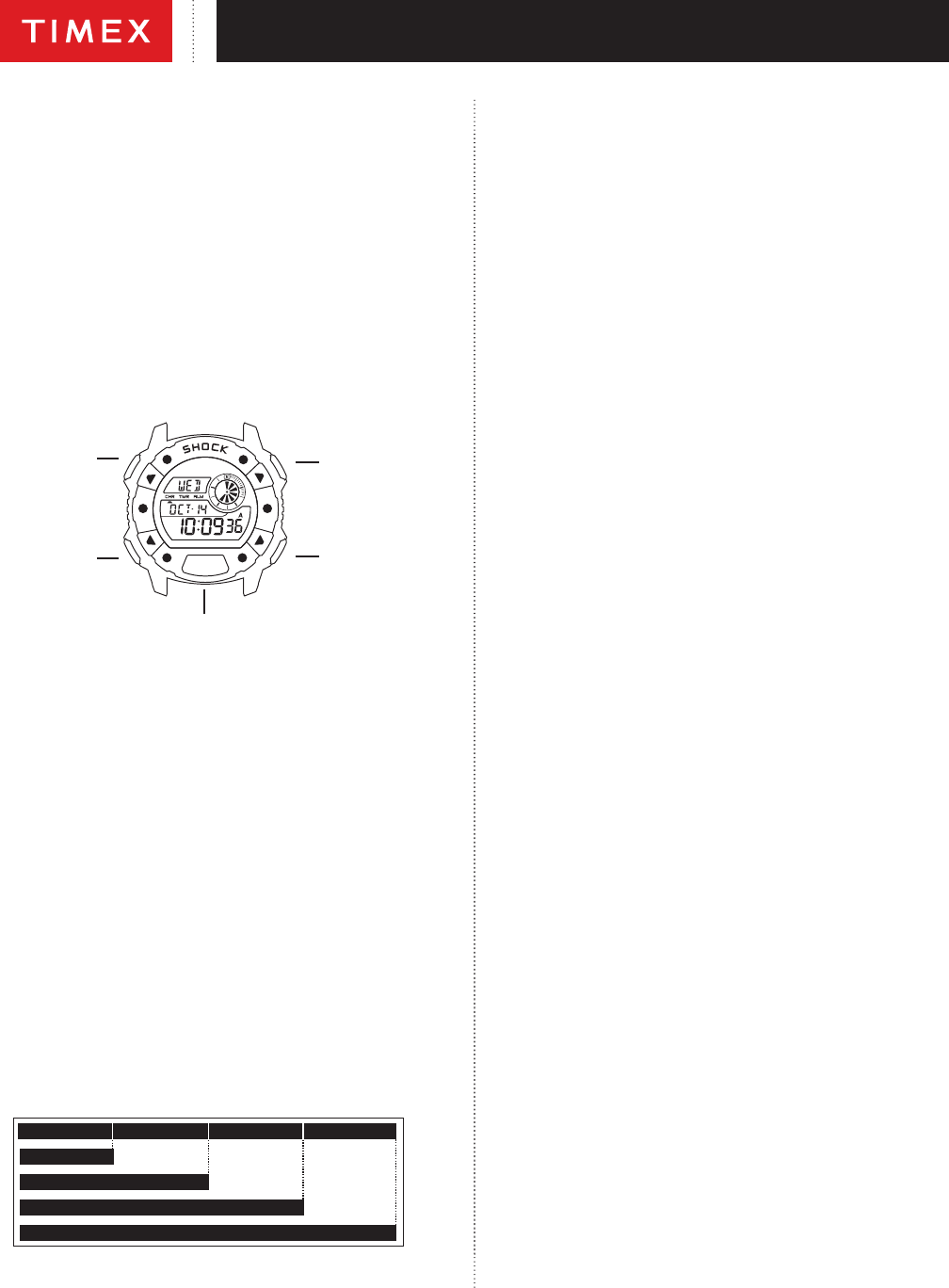
BASIC OPERATION
SET OR DONE
(To save changes
and exit setting)
MODE OR NEXT
(Proceed to
next step)
START/SPLIT OR +
(Increase value. Hold
to increase rapidly.)
STOP/RESET OR –
(Decrease value.
Hold to decrease
rapidly.)
INDIGLO
®
BUTTON
Model Number: 055
When setting, each button has a different function as indicated above.
Watch face will indicate when button changes function.
TIME/DATE/HOURLY CHIME/TIME ZONE
1. In TIME mode, press and hold SET. Time zone will ash.
2. To set, push
+ or to select rst or second time zone.
3. Press
NEXT. Hour digits ash.
4. Press
+ or to change hour including AM/PM. (Scroll through 12 hours to
get to AM/PM).
5. Press
NEXT. Minute digits ash.
6. Press
+ or to change minutes.
7. Press
NEXT. Second digits ash.
8. Press
+ or to set seconds to zero.
9. Press
NEXT. Day of week ashes.
10. Press
+ to to change day.
11. Continue pattern to set month, day of month, 12-hour or 24-hour time
display, MMM.DD or DD-MMM date format, turn hourly CHIME on/off,
turn BEEP on/off. If you select BEEP on, a beep will sound every time you
push a button (except INDIGLO
®
).
12. Press
DONE to conrm and exit or NEXT to continue and set second
time zone, if desired.
13. When in Time mode, press and hold
START/SPLIT to “peek” at second
time zone; hold for 4 seconds to switch time zones.
CHRONO
LAP 1 = 7.11 LAP 2 = 7.50
SPLIT 2 = 15.01
LAP 3 = 7.08
SPLIT 3 = 22.09
LAP 4 = 7.30
SPLIT 4 = 29.39
SPLIT 1 = 7.11
1. Press MODE until CHRONO appears.
2. Press and hold
SET.
3. The Display will read: FORMAT/SET, then LAP/SPL or SPL/LAP. CHR
indicator will appear.
4. Press
+ or to select desired format.
5. Press
DONE to conrm and exit.
6. To use chrono, press
START/SPLIT. Chrono continues to run even if you
exit the mode.
7. Press
STOP/RESET to stop chronograph from running OR while chrono is
running, press
START/SPLIT to take a split. Lap and split times will then
be displayed in the format you selected. The lap number will alternate
with the last two digits of the bottom line.
NOTES:
Lap and split times will appear frozen for 10 seconds. Press MODE to
release the display and see running chrono.
Press and hold
STOP/RESET to reset chronograph.
TIMER
1. Press MODE repeatedly until TIMER appears.
2. Press
SET. Hour digits ash.
3. Follow same pattern as setting TIME and ALARM to set hours (up to 24
hrs.), minutes, seconds, and select between REPEAT/AT END (timer
counts down and then repeats) or STOP/AT END (the timer counts down
and then stops).
4. Press
DONE to conrm and exit.
5. Press
START/SPLIT to start TIMER. Timer will continue to run even if you
exit Timer mode. If REPEAT/END selected will ash. If STOP/END selected
will ash. Sub-dial rotates in counter clockwise direction when Timer is
running.
6. An alarm melody will chime and INDIGLO
®
night-light ashes when the
timer has reached zero or before it starts to count down again.
7. Press
STOP/RESET to stop TIMER. Press again to reset countdown time.
ALARM
Setting the ALARM is similar to setting TIME. Your watch model has three
alarms. Follow below procedure to set each alarm.
1. Press MODE repeatedly until ALM1, ALM2, or ALM3 appears. Select
alarm you want to set.
2. Press
SET to set alarm.
3. Hour digits ash. Press
+ or to change hour.
4. Press
NEXT. Minute digits ash. Press + or to change minutes.
5. Press
NEXT. If in 12-hour format, AM/PM ashes. Press + or to change.
6. Press
NEXT. Press + or to select DAILY, WEEKDAYS OR WEEKENDS.
7. Press
DONE to conrm and exit.
8. Press START/SPLIT or
STOP/RESET to arm or disarm alarm. When
disarmed, OFF will be displayed. When armed, the alarm indicator will
appear under ALM.
9. The INDIGLO
®
night-light and alarm icon ashes and an alert sounds
when the alarm goes off. Press any button to silence. A back up alarm will
sound after ve minutes if you don’t press any buttons.
INDIGLO
®
NIGHT-LIGHT WITH NIGHT-MODE
®
FEATURE
Press INDIGLO
®
button to illuminate watch display for 2 - 3 seconds (5 - 6
seconds while setting). Electroluminescent technology used in the INDIGLO
®
night-light illuminates entire watch face at night and in low light conditions.
Any button pressed while INDIGLO
®
night-light is on keeps it on.
Press and hold INDIGLO
®
button for 4 seconds to activate NIGHT-MODE
®
feature. Moon icon P will appear in Time mode. Feature causes any button
press to activate INDIGLO
®
night-light for 3 seconds. NIGHT-MODE
®
feature
may be deactivated by pressing and holding INDIGLO
®
button again for 4
seconds, or it automatically deactivates after 8 hours.
Descărcaţi manualul în limba română (PDF, 1.2 MB)
(Protejați mediul înconjurător și imprimați acest manual numai dacă este neapărată nevoie)

Loading…

Evaluare

Spuneți-ne ce părere aveți despre Timex TW4B075009J Expedition Ceas de mana, lăsând o evaluare a produsului. Doriți să împărtășiți experiența dvs. cu acest produs sau să adresați o întrebare? Lăsați un comentariu în partea de jos a paginii.
Ești mulțumit de Timex TW4B075009J Expedition Ceas de mana?
Da Nu
Fiți primul care evaluează acest produs
0 voturi

Alăturați-vă conversației despre acest produs

Aici puteți împărtăși ce părere aveți despre Timex TW4B075009J Expedition Ceas de mana. Dacă aveți o întrebare, citiți mai întâi cu atenție manualul. Solicitarea unui manual se poate face folosind formularul nostru de contact.

Mai multe despre acest manual

Înțelegem că este plăcut să aveți un manual pe hârtie pentru Timex TW4B075009J Expedition Ceas de mana. Puteți oricând descărca manualul de pe site-ul nostru web și îl puteți imprima singur. Dacă doriți să aveți un manual original, vă recomandăm să contactați Timex. S-ar putea să ofere un manual original. Căutați manualul dvs. Timex TW4B075009J Expedition Ceas de mana într-o altă limbă? Alegeți limba preferată pe pagina noastră de pornire și căutați numărul de model pentru a vedea dacă îl avem disponibil.

Specificații

Marcă Timex
Model TW4B075009J Expedition
Categorie Ceasuri de mana
Tip fișier PDF
Mărime fișier 1.2 MB

Toate manualele pentru Timex Ceasuri de mana
Mai multe manuale pentru Ceasuri de mana

Întrebări frecvente despre Timex TW4B075009J Expedition Ceas de mana

Echipa noastră de asistență caută informații utile despre produs și răspunde la întrebările frecvente. Dacă descoperiți o inexactitate în întrebările frecvente, vă rugăm să ne anunțați utilizând formularul de contact.

O baterie din dispozitivul meu este oxidată, o mai pot folosi în siguranță? Verificat

Da, dispozitivul poate fi încă utilizat în siguranță. În primul rând, scoateți bateria oxidată. Nu folosiți niciodată mâinile goale pentru a face acest lucru. Apoi curățați compartimentul bateriei cu un tampon de bumbac înmuiat în oțet sau suc de lămâie. Lăsați-l să se usuce și introduceți baterii noi.

A fost util (942) Citeşte mai mult

Ceasul meu mecanic funcționează rapid, ce pot face? Verificat

Acest lucru ar putea fi cauzat de expunerea la un câmp magnetic. Poate fi rezolvat printr-un proces de demagnetizare efectuat de un ceasornicar profesionist.

A fost util (880) Citeşte mai mult

Ce reprezintă AM și PM? Verificat

AM înseamnă Ante Meridiem și indică faptul că ora este înainte de prânz. PM reprezintă Post Meridiem și indică faptul că ora este trecută de prânz.

A fost util (756) Citeşte mai mult

Ce este un „Cronograf”? Verificat

Un „Cronograf” este literalmente un „scriitor al timpului”. Termenul este folosit pentru a descrie ceasurile și ceasurile care indică ora din zi, precum și măsoară o anumită perioadă de timp, cum ar fi un cronometru.

A fost util (660) Citeşte mai mult

Ce este GMT? Verificat

GMT înseamnă Greenwich Mean Time (uneori numită UTC, reprezentând Timpul universal coordonat). Este timpul pentru longitudinea 0, care trece prin Greenwich lângă Londra.

A fost util (501) Citeşte mai mult

Ce este o mișcare de cuarț? Verificat

Ceasurile și ceasurile cu mișcare de cuarț sunt acționate de o baterie. Aceasta trimite un curent electric prin cristale de cuarț care vor vibra. Aceste vibrații sunt transmise mișcării. Deoarece vibrațiile au o frecvență fixă, ceasurile și ceasurile cu mișcare de cuarț sunt extrem de precise.

A fost util (483) Citeşte mai mult
Manual Timex TW4B075009J Expedition Ceas de mana

Produse asemanatoare

Categorii relevante

×
Download