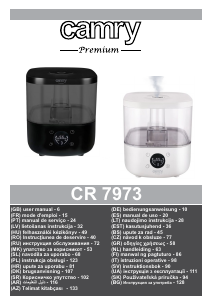
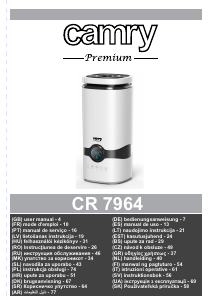
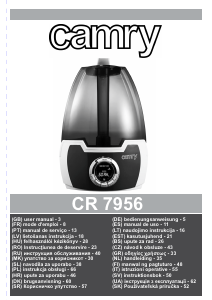
Manual Camry CR 7964 Umidificator

Ai nevoie de un manual pentru Camry CR 7964 Umidificator? Mai jos puteți vizualiza și descărca manualul PDF gratuit în limba română. Acest produs are în prezent 2 întrebări frecvente, 1 comentariu și are 2 voturi cu o evaluare medie a produsului de 0/100. Dacă acesta nu este manualul dorit, vă rugăm să ne contactați.

Produsul dvs. s-a defectat și manualul nu oferă nicio soluție? Mergeți la Repair Café pentru servicii de reparații gratuite.

Manual

Loading…

6
37. Do not lift the water tank by the water mist outlet.
38. It is prohibited to insert metal chips, wire, needles and other foreign objects into the
product or into the housing gaps, otherwise it may cause electric shock or malfunction.
The device is designed to work in rooms with a temperature of 5-40 ° C and a relative
humidity of 80%.
DESCRIPTION OF THE DEVICE: ULTRASONIC HUMIDIFIER (picture A)
A1. Water mist outlet A2. Water tank
A3. Base A4. LCD Control panel
A5. Water tank cover A6. Remote control
A7. Water descaling filter
LCD CONTROL PANEL (figure B)
B1. ON / OFF button B2. humidification intensity button HUMIDIFY
B3. TIMER button B4. HYGROSTAT button
B5. SLEEP button B6. Timer icons 1/2/4/8 hours
B7. Water shortage icon B8. Humidity and temperature indicator
B9. Humidification intensity indicator 1/2/3 (low / medium / highest)
USING (picture C)
Make sure the device is unplugged.
1.Remove the water tank cover (A5). Remove the water tank (A2) from the base of the machine (A3)
2.Top up the water tank (A2) only when the machine is switched off from the power supply. Do not pour water into the tank above the
maximum level. Do not pour water into the housing gaps shown in Figure C.
3.Place the filled water tank on the base (A3).
4.Close the water tank cover (A5).
5.Connect the device to the power supply. The device will emit a single sound and will wait for setting the operating mode.
6.Touch the power button (B1), the LCD screen will light up and the device will start working.
- Continuous operation:
Turn on the humidifier with the ON / OFF (B1) button. The humidity level (B9) and the current humidity and room temperature level (B8)
will be displayed. The default humidification intensity level after starting is 3 (highest). To change the humidification intensity, press the
HUMIFIDY (B2) button. The intensity adjustment is 3-stage, each press of the button (B2) changes the level by 1. The intensity level is
visualized by the humidification intensity indicator (B9).
- Delayed shutdown:
to program the device off after a certain time, press the TIMER (B3) button while the device is operating. Each pressing the TIMER (B3)
button will change , the programmed time cyclically: 1/2/4/8 hours. Pressing the TIMER button (B3) again to cancel the delayed
shutdown setting. The selected delay time of shutdown the device is visualized by the appropriate timer icon (B6).
- Constant humidity setting:
While the device is operating, press the HUMIDIFY (B4) button to enter the constant humidity mode. The default setting is 45%. Each
press of the button changes the programmed constant humidity within the range of 45-90% by 5%. The display in field B8. will flash the
selected humidity value five times, then it will return to the displaying interchangeably present humidity and temperature in the room. The
device will start when the humidity drops below the selected level from the declared value, and turn off after exceeding the programmed
humidity.
- Sleep mode:
This product has the function of intelligent air humidification during sleep. Activates the 65% intelligent constant humidity function by
touching the SLEEP button (B5) in the operating state. The humidity indicator (B8) on the screen is flashing. After 5 seconds, it
automatically turns off the display screen and maintains the previously selected operating settings. After starting the sleep function, the
display screen is illuminated by pressing the function button (B2 or B3 or B4) to display the current settings on the screen. If no operation
is performed for 5 seconds, the screen will go blank again. To deactivate the sleep function, press the SLEEP (B5) button twice.
The remote control (A6) operates the device in the same way as the control panel buttons on the device housing.
Low water indication: the low water information icon (B7) will be displayed. The delayed switch-off and constant humidity setting is
canceled.
7. Press the power button (B1) again so that the device stops working and goes into standby mode. Unplug the power plug.
Descărcaţi manualul în limba română (PDF, 3.54 MB)
(Protejați mediul înconjurător și imprimați acest manual numai dacă este neapărată nevoie)

Loading…

Evaluare

Spuneți-ne ce părere aveți despre Camry CR 7964 Umidificator, lăsând o evaluare a produsului. Doriți să împărtășiți experiența dvs. cu acest produs sau să adresați o întrebare? Lăsați un comentariu în partea de jos a paginii.
Ești mulțumit de Camry CR 7964 Umidificator?
Da Nu
0%
100%
2 voturi

Alăturați-vă conversației despre acest produs

Aici puteți împărtăși ce părere aveți despre Camry CR 7964 Umidificator. Dacă aveți o întrebare, citiți mai întâi cu atenție manualul. Solicitarea unui manual se poate face folosind formularul nostru de contact.

Poul heckmann 01-02-2024
Nu se poate porni

răspuns | A fost util (0) (Tradus de Google)

Mai multe despre acest manual

Înțelegem că este plăcut să aveți un manual pe hârtie pentru Camry CR 7964 Umidificator. Puteți oricând descărca manualul de pe site-ul nostru web și îl puteți imprima singur. Dacă doriți să aveți un manual original, vă recomandăm să contactați Camry. S-ar putea să ofere un manual original. Căutați manualul dvs. Camry CR 7964 Umidificator într-o altă limbă? Alegeți limba preferată pe pagina noastră de pornire și căutați numărul de model pentru a vedea dacă îl avem disponibil.

Specificații

Marcă Camry
Model CR 7964
Categorie Umidificatoare
Tip fișier PDF
Mărime fișier 3.54 MB

Toate manualele pentru Camry Umidificatoare
Mai multe manuale pentru Umidificatoare

Întrebări frecvente despre Camry CR 7964 Umidificator

Echipa noastră de asistență caută informații utile despre produs și răspunde la întrebările frecvente. Dacă descoperiți o inexactitate în întrebările frecvente, vă rugăm să ne anunțați utilizând formularul de contact.

La ce umiditate este o idee bună să folosiți un umidificator? Verificat

Dacă există o umiditate interioară de 50% sau mai mică, poate fi util un umidificator.

A fost util (371) Citeşte mai mult

Care este umiditatea ideală pentru un spațiu de locuit? Verificat

Umiditatea ideală într-o casă este între 40-60%. La o umiditate mai mare sau mai mică, ciupercile, bacteriile și virusurile sunt mai susceptibile de a se dezvolta și puteți experimenta disconfort personal.

A fost util (203) Citeşte mai mult
Manual Camry CR 7964 Umidificator

Produse asemanatoare

Categorii relevante

×
Download