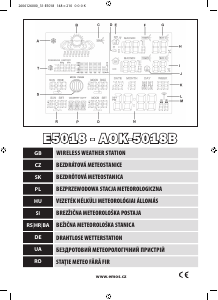
Manual EMOS E5018 Stație meteo

Ai nevoie de un manual pentru EMOS E5018 Stație meteo? Mai jos puteți vizualiza și descărca manualul PDF gratuit în limba română. Acest produs are în prezent 5 întrebări frecvente, 1 comentariu și are 15 voturi cu o evaluare medie a produsului de 67/100. Dacă acesta nu este manualul dorit, vă rugăm să ne contactați.

Produsul dvs. s-a defectat și manualul nu oferă nicio soluție? Mergeți la Repair Café pentru servicii de reparații gratuite.

Manual

Loading…
3
Atmospheric pressure – history and graph
Atmospheric pressure in hPa or inHg units and the pressure history graph
over the last 10 hours is shown in the T eld on the right.
When moving the weather station to another location, the measured
values will be aected.
The measurements will stabilise within 12 hours after battery insertion
or station relocation.
By repeated pushing of the HISTORY button you can gradually see the
pressure values over the last 12 hours.
The measured value + time shift will be displayed in the T eld on the left.
Manual setting of altitude above sea level, fore-
cast icon, pressure units
After inserting the battery or after long holding down of the HISTORY
button you can set your altitude above sea level to make the pressure
calculation more accurate.
Use the buttons + and – to set the value in the range -200 m to 2000 m
(resolution 10 m).
After setting the altitude, push HISTORY and use the + and – buttons
to set the weather forecast icon (eld B).
After an hour the weather forecast will be updated to reect the mea
-
sured pressure.
After setting the weather forecast icon, push the HISTORY button and use
the + a – buttons to set the pressure units in hPa or in Hg.
To return to the main menu, push the HISTORY button.
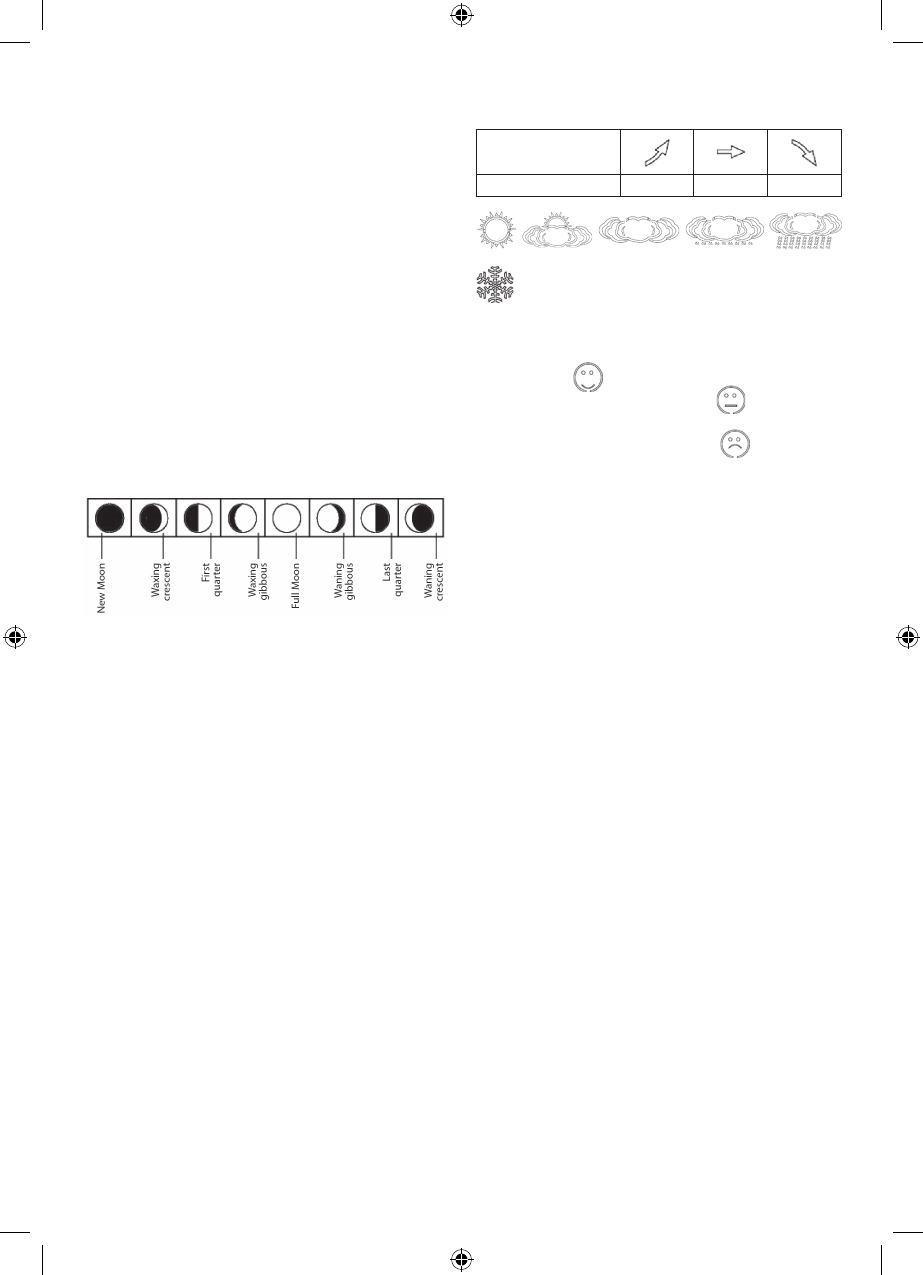
Lunar phases
Lunar phase is shown in the S eld.
The main lunar phase icons are as follows:
Showing the maximum and minimum measured
values of temperature and humidity
Push the + button to gradually show the maximum and minimum mea-
sured temperatures and humidity. By holding the + button the measured
values will be erased from memory.
Alarm clock setting
The weather station allows setting 2 alarm times.
Use the MODE button to choose alarm clock A1 or A2. The choice will be
shown in the M eld.
A1 – the alarm clock for workdays (Monday – Friday)
A2 – the alarm clock for weekends (Saturday-Sunday)
By holding the MODE button and using the + and – buttons you can set
the required wake up time.
The alarm clock is activated by the MODE button and the – button.
A1 or A2 alarm clock icon or both icons will be dispalyed.
By repeated pressing of the - button the alarm clock is deactivated and
the icon disappears.
Snooze function and light function (SNOOZE/
LIGHT)
By pressing the SNOOZE button at the top of the weather station you can
postpone the alarm by 5 minutes.
Press it when the alarm goes o and the alarm clock icon 1, 2 will start
blinking (M eld).
To cancel the SNOOZE function, press any button on the rear and the icon
stops blinking and it stays on the display. The alarm clock will activate
itself the next day again.
By pushing the SNOOZE/LIGHT button, a blue light on the display will be
activated for 5 seconds.
Weather forecast
The weather station forecasts the weather based on the atmospheric
pressure for the next 12 – 24 hours for the area 15-20 km around it.
The weather forecast accuracy is 70 – 75 %.
The weather forecast icon is situated in eld B.
Because the weather forecasts may not be 100% accurate, the producer
or seller cannot be responsible for any losses due to inaccurate weather
forecast.
After the rst setting or resetting of the weather station, it takes some
12 hours before the weather station starts forecasting correctly.
The weather station shows 5 icons for weather forecast and 3 for pressure.
On display indication
Weather trend better no change worse
Sunny Clouds Overcast Rain Storm
- This icon is displayed when the interior temperature is lower
than +4 °C
Physical comfort icon – a smiley
The comfort icon is selected in the J eld.
JIf the humidity is between 40 - 70 % RV and the temperature is between
20 – 28 °C, the icon
COMFORT – comfortable conditions – appears.
If the humidity is lower than 40 % RV, the icon
DRY – dry conditi-
ons - appears.
If the humidity is higher than 70 % RV, the icon
WET – wet condi-
tions - appears.
If the temperature is not within 20 – 28 °C and 40 - 70 % RV, no icon will
be displayed.
Setting thermal limits of maximum and mini-
mum temperature
Hold the – button and OFF – deactivated - starts blinking next to the E icon.
To activate, push the + or – button (ON will be displayed)
Use MODE button to set the limit, use the buttons + or -. By holding the
buttons you can move faster.
Set the value of thermal limit for the minimum and maximum tempe
-
ratures.
The range for a thermal limit is -50 °C to +70 °C, resolution 1 °C.
When exceeding the set thermal limit, a sound signal is activated and the
value starts blinking.
The thermal limits can be set separately on up to 3 sensors.
Troubleshooting
If the clock does not show the correct time or if the reception icon is not
displayed, reset the clock by pushing the RESET button. Incorrect time
or loss of synchronisation may be due to electromagnetic interference.
Maintenance
The product is designed so that with proper use it can serve reliably for
many years. There are several guidelines for correct operation:
Before you start using the product, read the user manual carefully.
Do not put the product in direct sunlight, extreme cold or moisture
and sudden temperature changes. It would lower the measurement
accuracy.
Do not put the product in locations prone to vibrations and shocks – it
could damage the product.
Do not subject the product to excessive pressure, shocks, dust, high
temperature or moisture – it might harm its functionality, deplete its
energy, damage the batteries or deform the plastic components.
Do not subject the product to rain or moisture, unless it is designed
for exterior use.
Do not place it near any sources of open re, such as a burning candle.
Do not put the product in places with insucient airow.
Do not stick anything into the vents of the product.
Do not interfere with the internal electric circuits of the product – you
can damage it and render the warranty invalid. The product should be
repaired only by qualied professionals.
Clean with soft wet cloth. Do not use solvents or cleaning detergents
– they might scratch the plastic elements and damage the electric
circuits.
Do not submerge the product under water or other liquid.
The product must not be subjected to dripping or splashing water.
• When the product is damaged or malfunctioning, do not repair it on
your own. Have it repaired at the point of purchase.
Descărcaţi manualul în limba română (PDF, 1.02 MB)
(Protejați mediul înconjurător și imprimați acest manual numai dacă este neapărată nevoie)

Loading…

Evaluare

Spuneți-ne ce părere aveți despre EMOS E5018 Stație meteo, lăsând o evaluare a produsului. Doriți să împărtășiți experiența dvs. cu acest produs sau să adresați o întrebare? Lăsați un comentariu în partea de jos a paginii.
Ești mulțumit de EMOS E5018 Stație meteo?
Da Nu
67%
33%
15 voturi

Alăturați-vă conversației despre acest produs

Aici puteți împărtăși ce părere aveți despre EMOS E5018 Stație meteo. Dacă aveți o întrebare, citiți mai întâi cu atenție manualul. Solicitarea unui manual se poate face folosind formularul nostru de contact.

Alexa 25-04-2021
Îmi place foarte mult produsul, dar emite bipuri la anumite intervale, ceea ce este destul de enervant noaptea... Știu că indică ceva, dar nu prea îmi dau seama exact ce și nicăieri nu pot găsi o modalitate de a opri bipurile. nu ciripește tot timpul, doar unul, dar din păcate nici eu nu mă pot obișnui. Multumesc pentru raspuns :)

răspuns | A fost util (2) (Tradus de Google)

Mai multe despre acest manual

Înțelegem că este plăcut să aveți un manual pe hârtie pentru EMOS E5018 Stație meteo. Puteți oricând descărca manualul de pe site-ul nostru web și îl puteți imprima singur. Dacă doriți să aveți un manual original, vă recomandăm să contactați EMOS. S-ar putea să ofere un manual original. Căutați manualul dvs. EMOS E5018 Stație meteo într-o altă limbă? Alegeți limba preferată pe pagina noastră de pornire și căutați numărul de model pentru a vedea dacă îl avem disponibil.

Specificații

Marcă EMOS
Model E5018
Categorie Stații meteo
Tip fișier PDF
Mărime fișier 1.02 MB

Toate manualele pentru EMOS Stații meteo
Mai multe manuale pentru Stații meteo

Întrebări frecvente despre EMOS E5018 Stație meteo

Echipa noastră de asistență caută informații utile despre produs și răspunde la întrebările frecvente. Dacă descoperiți o inexactitate în întrebările frecvente, vă rugăm să ne anunțați utilizând formularul de contact.

Stația meteo mea a prezis că va ploua, dar acest lucru nu s-a întâmplat. De ce este asta? Verificat

Predicția pentru stația meteo se bazează pe presiunea aerului. În general, presiunea scăzută înseamnă vreme rea, iar presiunea ridicată înseamnă vreme bună. Este posibil ca modelul vremii să se dezvolte diferit decât prezice presiunea aerului.

A fost util (1466) Citeşte mai mult

Care este cea mai bună locație pentru o stație meteo și senzorii săi? Verificat

Stația meteo în sine este plasată în interior și trebuie ținută departe de sursele de căldură, cum ar fi bucătăria, ferestrele sau aparatele electrice. Un senzor de temperatură exterior separat trebuie plasat în umbră și la cel puțin 1,25m deasupra solului. Un senzor de ploaie trebuie amplasat într-o zonă deschisă, unde poate colecta oricând ploaia. Un senzor de vânt trebuie plasat și într-o zonă deschisă, cu orice obstacole care influențează vântul.

A fost util (393) Citeşte mai mult

Stația mea meteo are un pluviometru, poate măsura și cantitatea de zăpadă? Verificat

Unele aparate de măsurare a ploii sunt echipate cu un element de încălzire, ceea ce face ca zăpada să se topească și să permită măsurarea acesteia. Fără element de încălzire, pluvometrul se va înfunda și nu se poate efectua nicio măsurare.

A fost util (279) Citeşte mai mult

Pot lăsa o baterie înlocuibilă într-un dispozitiv mult timp? Verificat

Bateriile înlocuibile pot rămâne într-un dispozitiv mult timp dacă dispozitivul este utilizat. Atunci când un dispozitiv este depozitat mult timp, este recomandabil să scoateți bateriile pentru a preveni oxidarea.

A fost util (279) Citeşte mai mult

O baterie din dispozitivul meu este oxidată, o mai pot folosi în siguranță? Verificat

Da, dispozitivul poate fi încă utilizat în siguranță. În primul rând, scoateți bateria oxidată. Nu folosiți niciodată mâinile goale pentru a face acest lucru. Apoi curățați compartimentul bateriei cu un tampon de bumbac înmuiat în oțet sau suc de lămâie. Lăsați-l să se usuce și introduceți baterii noi.

A fost util (278) Citeşte mai mult
Manual EMOS E5018 Stație meteo

Produse asemanatoare

Categorii relevante

×
Download