Manual Thomson ROC2411 Telecomandă

Ai nevoie de un manual pentru Thomson ROC2411 Telecomandă? Mai jos puteți vizualiza și descărca manualul PDF gratuit în limba română. Acest produs are în prezent 6 întrebări frecvente, 2 comentarii și are 5 voturi cu o evaluare medie a produsului de 40/100. Dacă acesta nu este manualul dorit, vă rugăm să ne contactați.

Produsul dvs. s-a defectat și manualul nu oferă nicio soluție? Mergeți la Repair Café pentru servicii de reparații gratuite.

Manual

Loading…
ROC2411
00131897
Operating Instructions .......................................................... 01
Mode d‘emploi ....................................................................... 05
Bedienungsanleitung ............................................................. 09
Instrucciones de uso ............................................................. 17
Istruzioni per l‘uso ................................................................. 13
Manual de instruções ............................................................ 25
Руководство по эксплуатации ......................................... 33
Gebruiksaanwijzing ............................................................... 21
Instrukcja obsługi ................................................................... 37
Használati útmutató .............................................................. 45
Οδηγίες χρήσης..................................................................... 29
Návod k použití ...................................................................... 41
S K
Návod na použitie .................................................................. 41
T R
Kullanma kılavuzu .................................................................. 41
Bruksanvisning ....................................................................... 49
Pistokelaturi ............................................................................ 61
R O
Manual de utilizare ................................................................ 41
1
GB
Testing the remote control before
you programme it
1. Turn on the product you want to control.
2. Press the Mode key that corresponds to the type
of product you want to control: TV: television set,
DVD: DVD player, , SAT/STB: satellite or cable
receiver.
3. Direct the remote control towards your equipment
and try to switch it off by simply pressing the key G.
If the device does not turn off, you must program the
remote control using one of the methods A, B, C or
D described hereafter.
Note 1: Except for the TV key, the DVD, SAT/STB
mode keys can be programmed to control a device
other than that indicated on the key. It is therefore
possible, for example, to allocate SAT mode to the
DVD key. You must enter the code corresponding to
the manufacturer and the device by using one of the
methods indicated in this manual.
However, method D (automatic search for a code)
will greatly simplify the task for you. In this case it
is only necessary to enter a code from the list that
corresponds to the type of device, for example: 0603
for a Thomson satellite receiver) and then to run the
automatic search procedure. The remote control will
then test all the codes automatically until it fi nds those
that control the receiver.
Note 2: To control 2 devices of the same type and the
same brand (2 Thomson VCRs, 2 Thomson satellite
receivers, ...) ensure fi rst that these two devices are not
set to react to the same sub code, they will require one
sub code for one and a different sub code for the other
(i.e., codes A and B with Thomson devices). Once you
have checked this, successively program 2 separate
mode keys using method D.
Programming
the remote control
Method A – Fast programming
with 1-digit subcode
Before you start programming, you must fi nd the
subcode of the set to be controlled. Entering a subcode
lets the remote control test a predefi ned list of codes.
Refer to the list provided with these instructions, page
I of the subcodes.
1. Switch on the set you want to control.
2. Hold down the SETUP key until the indicator lamp
blinks and then remains lit (the indicator light
remains on for a few seconds to give you the time to
proceed with the following steps. The indicator lamp
ashes to signal that this time is almost up, and then
goes off).
3.
Press the key that corresponds to the type of equipment
you want to control: TV: television set, DVD: DVD
player, , SAT/STB: satellite receiver, cable, DVBT,
ADSL.
4. While the indicator is lit, type in the subcode
(example: 1 for THOMSON).
5. Direct the remote control towards the set and try to
switch it off by pressing the key G.
6. If the set you want to control switches off, press OK
to memorise the code.
7. Should the set not switch off, press key G repeatedly,
until the set switches off. Between two key presses,
leave enough time for the indicator lamp to light up
again (about 1 second). Proceeding this way will
enable you to see whether the set responds or not.
8. Immediately upon the switching-off of the set to be
controlled, press OK to store the code.
3
15
5
1
7
9
11
13
17
19
2
4
18
6
8
12
14
2021
Characteristics - Caractéristiques - Eigenschaften - Características
Caratteristiche - Características - Технические характеристики -
Eigenschappen - Dane techniczne - Karakterisztika - χαρακτηριστικά
Technické údaje - Charakteristiký - Karakterisitik - Data -
Ominaisuudet - Caracteristică
Dimensions - Dimensions - Abmessungen - Dimensiones - Dimensioni
- Dimensões -
размеры - Afmetingen -
Wymiary
-
Méret -
Διαστάσεις
- Rozměry
- Rozmery - Boyutlar - Mått - Mitat - Dimensiuni
= 214 x 45 x 24 mm
Weight = 86 grammes
Poids = 86 grammes
Gewicht = 86 Gramm
Peso = 86 gramos
Peso = 86 grammi
Peso = 86 gramas
вес = 86 грамм
Gewicht = 86 gram
Ciężar = 86 g
Súly = 86 gramm
Βάρoς = 86 γραμμάρια
Hmotnost = 86 g
Váha = 86 gram
Ağırlık = 86 gram
Vikt = 80 gram
Paino = 86 grammaa
Greutate = 86 gram
AAA
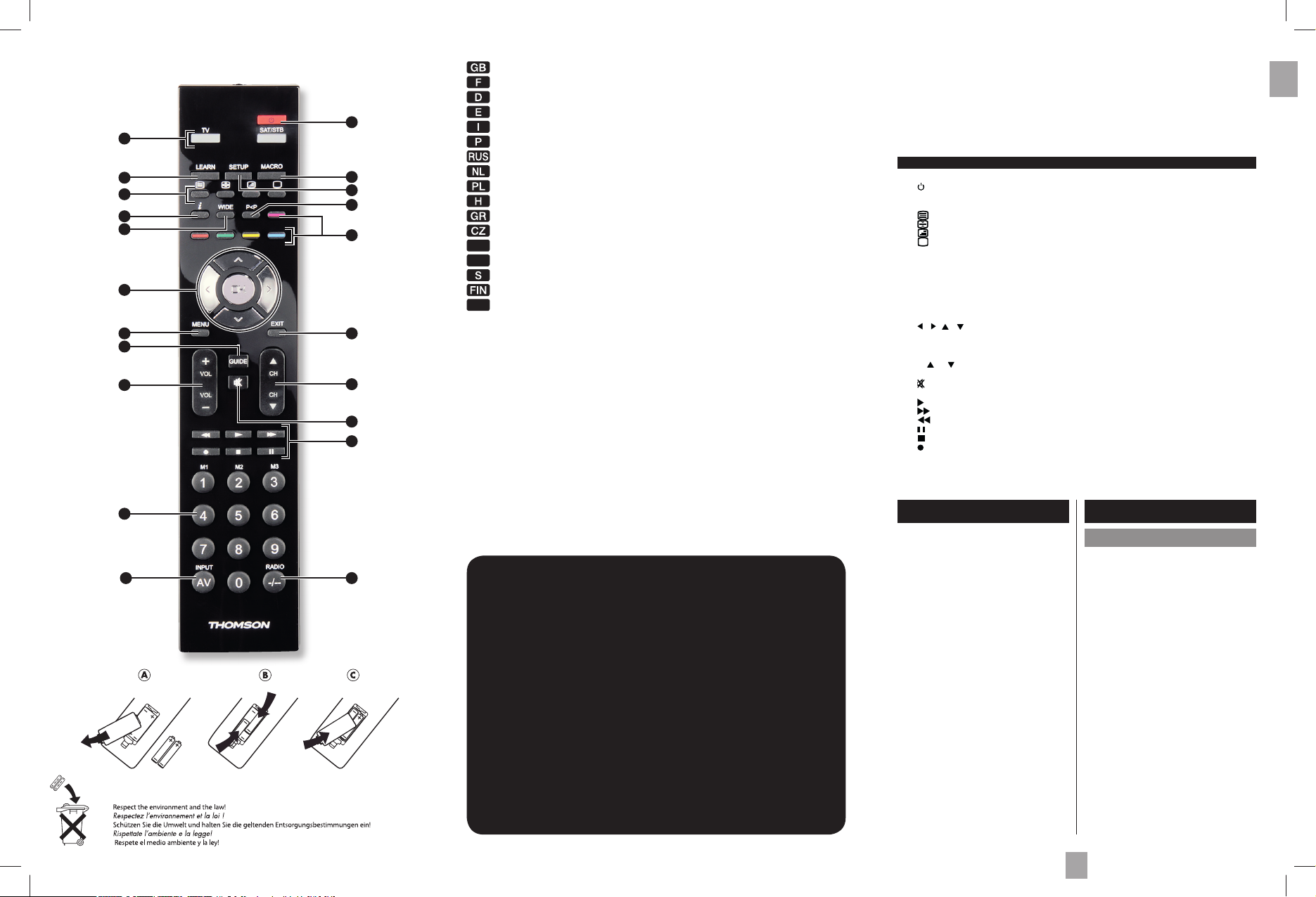
1 Mode keys : Select the device to control (TV, DVD, …).
2 : On/Standby or Standby only, depending on the equipment being used.
3 Learn : Used for the learning codes procedure (key copying) (see page 3).
4 Macro : Macro selection (see page 4).
5 : Teletext On.
: Teletext hold.
: Teletext Mix.
: Teletext Off.
6 Setup : Allows you to program your remote before the fi rst use. It also allows you
to access to secondary functions of certain A/V appliances (Shift). Press and
release the “Setup” key followed by the function key you want.
7 i : Displays information of the selected appliance.
8 P<P : Previous channel.
9 Wide : Change the size of the image (4/3, 16/9, etc...).
10 Coloured keys : Can be used to select categories when teletext is activated, and specifi c
functions depending on the make.
11
/ / / : Allow you to navigate the menus horizontally and verticaly.
OK : Confi rms a selection.
12 Exit : Turn off the menu of the selected product.
13 Menu : Turns on the menu of the selected product.
14 CH /CH : Channel Up and Channel Down buttons.
15 Guide : Electronic Program Guide.
16 (Mute) : Switches the selected appliance sound off.
17 Vol+/Vol- : Increases (+) or decreases (-) the volume of the selected device.
18 (Play) : Play a DVD disc (DVD, ...).
(FF) : Fast forward (DVD, ...).
(RW) : Goes backward (DVD, ...).
(Pause) : Suspends play and stops on an image.
(Stop) : Stop the disc (DVD, ...).
(Record) : To record, press the RECORD key twice.
19 Numeric keys 0-9 :
These keys have the same functions as those of your original remote and are
also used to enter the codes for different products. Selection of a macro (M1, M2, M3
)
20 -/-- : Access to channel > 9 and Radio selection depending of the device.
21 AV : For selecting an external source (SCART, HDMI, ...).
The keys
10
16
This universal remote control (2 in 1) is compatible with the majority of television
sets, DVD players, as well as digital boxes such as satellite or cable receivers,
DVBT receivers (Digital Video Broadcast Terrestrial), ADSL decoders, and so on.
This remote control was programmed in the factory, so that you can use it to control most
of the sets of the THOMSON group’s make. For this reason, we recommend that prior to
attempting to programme the remote control, you try it out by means of one of the methods
described in this user manual. However, fi rst of all, you must install 2 batteries (AAA) in the
remote control.
Please keep this guide along with the code list (provided separately), so that you can
subsequently programme your remote control for use with other sets.
Descărcaţi manualul în limba română (PDF, 2.43 MB)
(Protejați mediul înconjurător și imprimați acest manual numai dacă este neapărată nevoie)

Loading…

Evaluare

Spuneți-ne ce părere aveți despre Thomson ROC2411 Telecomandă, lăsând o evaluare a produsului. Doriți să împărtășiți experiența dvs. cu acest produs sau să adresați o întrebare? Lăsați un comentariu în partea de jos a paginii.
Ești mulțumit de Thomson ROC2411 Telecomandă?
Da Nu
40%
60%
5 voturi

Alăturați-vă conversației despre acest produs

Aici puteți împărtăși ce părere aveți despre Thomson ROC2411 Telecomandă. Dacă aveți o întrebare, citiți mai întâi cu atenție manualul. Solicitarea unui manual se poate face folosind formularul nostru de contact.

Freitz geimann 23-09-2022
Nu ma inteleg cu aparatul.Am 79 de ani si nu inteleg ordinea.Am un televizor Sony si Thomson si un receptor THS 220.Cer o explicatie mai buna. Mulțumiri.

răspuns | A fost util (2) (Tradus de Google)
Angelo 19-11-2023
Bună dimineața, am probleme cu telecomanda unui televizor United

răspuns | A fost util (0) (Tradus de Google)

Mai multe despre acest manual

Înțelegem că este plăcut să aveți un manual pe hârtie pentru Thomson ROC2411 Telecomandă. Puteți oricând descărca manualul de pe site-ul nostru web și îl puteți imprima singur. Dacă doriți să aveți un manual original, vă recomandăm să contactați Thomson. S-ar putea să ofere un manual original. Căutați manualul dvs. Thomson ROC2411 Telecomandă într-o altă limbă? Alegeți limba preferată pe pagina noastră de pornire și căutați numărul de model pentru a vedea dacă îl avem disponibil.

Specificații

Marcă Thomson
Model ROC2411
Categorie Telecomenzi
Tip fișier PDF
Mărime fișier 2.43 MB

Toate manualele pentru Thomson Telecomenzi
Mai multe manuale pentru Telecomenzi

Întrebări frecvente despre Thomson ROC2411 Telecomandă

Echipa noastră de asistență caută informații utile despre produs și răspunde la întrebările frecvente. Dacă descoperiți o inexactitate în întrebările frecvente, vă rugăm să ne anunțați utilizând formularul de contact.

Cum conectez o telecomandă universală la televizor? Verificat

Pentru a vă conecta telecomanda universală, aveți nevoie de numărul modelului și de marca atât a telecomenzii, cât și a televizorului. Există o listă de coduri pentru mărci și numere de model în manualul telecomenzii.

A fost util (7983) Citeşte mai mult

De ce sunt litere lângă numerele de pe telecomandă? Verificat

Anumite setări ale televizorului pot necesita introducerea literelor. Există, de obicei, trei litere sau alte caractere pe un buton. Când este necesară introducerea literelor, puteți apăsa butonul o dată pentru prima literă, apăsați de două ori pentru a doua literă și apăsați de 3 ori pentru a treia literă. În acest fel, textul poate fi scris cu un număr minim de butoane.

A fost util (681) Citeşte mai mult

Telecomanda mea va funcționa și pe alte modele de televiziune de aceeași marcă? Verificat

Adesea, telecomanda unui televizor va funcționa și pe modele similare ale aceluiași brand. Cu toate acestea, este neobișnuit să funcționeze pe toate modelele acelui brand. Telecomandele universale sunt mai potrivite pentru a face acest lucru.

A fost util (524) Citeşte mai mult

Care este intervalul mediu al unei telecomenzi cu infraroșu? Verificat

O telecomandă cu infraroșu medie avea o rază de acțiune între 3 și 6 metri. De asemenea, cu cât dispozitivul este mai departe, cu atât va fi mai greu să vizezi.

A fost util (412) Citeşte mai mult

O baterie din dispozitivul meu este oxidată, o mai pot folosi în siguranță? Verificat

Da, dispozitivul poate fi încă utilizat în siguranță. În primul rând, scoateți bateria oxidată. Nu folosiți niciodată mâinile goale pentru a face acest lucru. Apoi curățați compartimentul bateriei cu un tampon de bumbac înmuiat în oțet sau suc de lămâie. Lăsați-l să se usuce și introduceți baterii noi.

A fost util (370) Citeşte mai mult

Pot lăsa o baterie înlocuibilă într-un dispozitiv mult timp? Verificat

Bateriile înlocuibile pot rămâne într-un dispozitiv mult timp dacă dispozitivul este utilizat. Atunci când un dispozitiv este depozitat mult timp, este recomandabil să scoateți bateriile pentru a preveni oxidarea.

A fost util (271) Citeşte mai mult
Manual Thomson ROC2411 Telecomandă

Produse asemanatoare

Categorii relevante

×
Download